Assess camera alerts. Coordinate responses.
When an alert arrives from a gate, fence or asset, operators need to assess what happened quickly. The Operator Console connects camera imagery and POIs to response decisions and tasks for teams on site.
From an alert to a verified response.
The operator reviews available imagery and decides on the response. Additional sensors and teams can be directed to clarify the situation.
Record the observation
Capture a camera observation as a POI with location, time and source. The operator sees the affected area on the map.
Review imagery
Assess the camera footage and request further imagery if needed. A suitable connected aircraft can provide another perspective.
Approve a response
The operator decides what happens next: continue observing, direct the camera or assign an on-site inspection.
Document the result
The team inspects the POI and reports its findings. Recordings, positions and detections remain available for review.
Oversee the site and ongoing tasks.
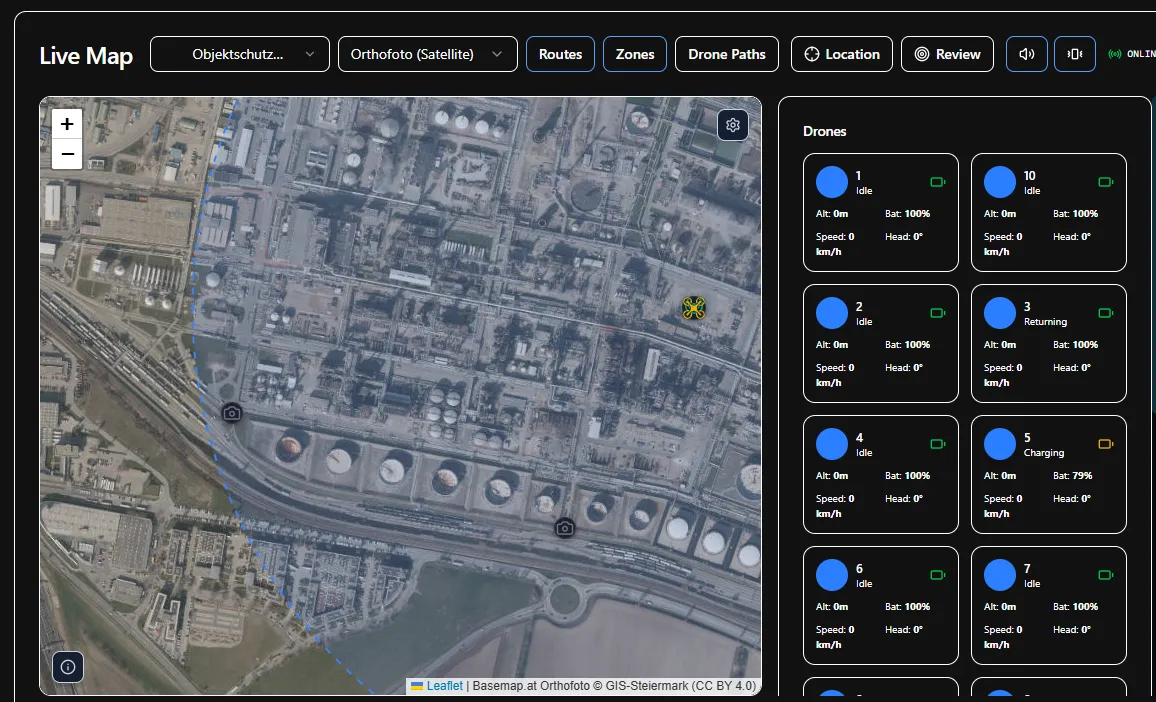
Mission Control shows the site with camera positions, routes and active tasks. Operators can monitor devices and coordinate an inspection of the affected area.
- Site and sensors
- Locate cameras, inspection routes and zones on the site map.
- Assessment and approval
- Review imagery at the POI. Required approvals and manual intervention remain with the operator.
- Tasks and reports
- Assign teams using the location and imagery, then link their findings to the POI.
Connect existing cameras and systems.
Integration depends on available video and metadata interfaces. Aircraft and control functions require suitable adapters and approvals. We establish how reports are assessed, responses approved and teams brought into the operation.
Integration & interfacesLet’s look at your site.
We discuss your existing sensors, alert handling and on-site responsibilities. We then define the scope of a demonstration, technical evaluation or pilot project.