Plan and monitor inspection routes.
Power corridors, pipelines and railways extend over large areas. In the Operator Console, you plan inspections, follow tasks assigned to connected devices and review observations along the route.
Inspect sections and assess observations.
Routes, observations and ongoing tasks remain visible on the map. Operators decide which locations need closer inspection and who will carry it out.
Define inspection areas
Plan sections, routes and scan areas on the map, taking restricted zones and available equipment into account.
Follow inspections
Monitor positions, device status and the progress of ongoing tasks. Live imagery from connected cameras helps operators assess conditions along the route.
Assess POIs
Record an observation with imagery, time and source. The operator reviews the footage and decides whether another inspection is required.
Inspect on site
Send a team to the affected section with the location, imagery and task. Findings are linked to the POI and remain available for review.
Manage routes and tasks on one map.
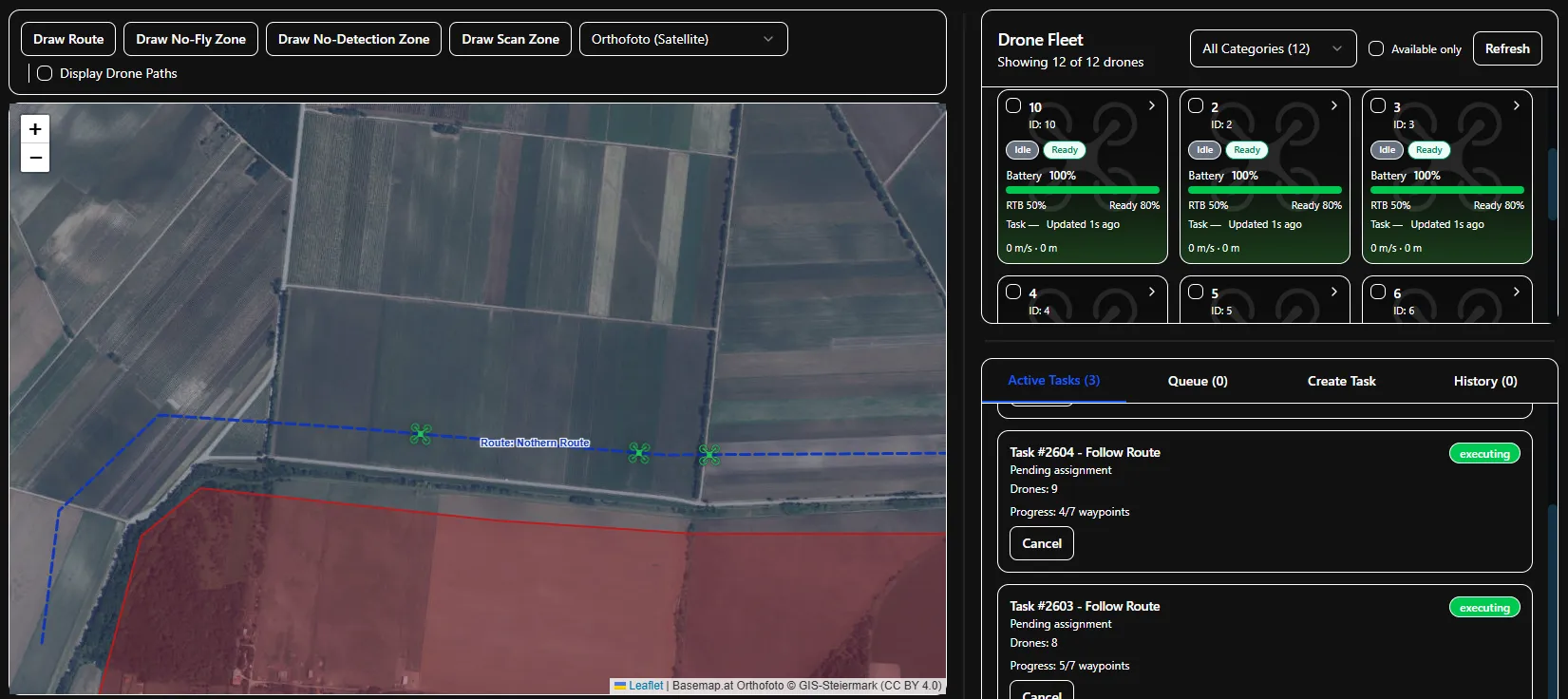
Mission Control shows planned routes, zones, available devices and active tasks. Operators see which sections are being inspected and where intervention is required.
- Routes and zones
- Define inspection routes, scan areas and restricted zones on the map.
- Devices and tasks
- Follow the position, status and task progress of connected devices during operations.
- Imagery and POIs
- Review observations at their location and return to the associated recording.
For your routes and your equipment.
Routes and aircraft rotation depend on terrain, range and available equipment. Cameras and aircraft connect through suitable interfaces. We establish which control functions to use based on your devices and approved operating conditions.
Integration & interfacesHow do you organise your inspections?
We discuss the sections you inspect, your existing systems and the tasks of the operations centre. We then agree the scope of a demonstration, technical evaluation or pilot project.